Data Masking in ETL: Types, Techniques and A Simple Method

Sensitive data leaks don't always happen because of hackers. More often, they happen because raw production data got copied into a dev environment, shared with a vendor, or handed to an analyst, but without anyone thinking twice. That's exactly the gap data masking is designed to close.
In this guide, we'll cover what data masking is, when you need it, the most common techniques, and how to apply it directly inside your ETL pipeline.
What is Data Masking in ETL?
When moving or syncing data through an ETL pipeline, data masking is a key step to keep your information safe, private, and compliant. It is an essential part of the plan whenever sensitive data is being transferred to prevent leaks and protect your business.
Data masking is the process of hiding or replacing sensitive information with fictional but structurally realistic data. The masked data looks and behaves like real data, with the same format, length, and type, but it carries no actual sensitive value.
This matters most when data moves between systems. Any time you're migrating, syncing, or replicating data that contains personally identifiable information (PII), financial records, health data, or other regulated fields, data masking should be part of the process. It prevents sensitive data from landing in places it shouldn't, such as test databases, analytics platforms, or third-party systems, while keeping the data usable for its intended purpose.
Static vs. Dynamic Data Masking
Data masking comes in two main forms, and the right choice depends on where and how the data is being used.
Static data masking
Static data masking works by creating a separate copy of the dataset where sensitive fields have been permanently replaced. The original data stays untouched in production; the masked copy is safe to use anywhere else, like development environments, QA testing, analytics pipelines, or external sharing.
Dynamic data masking
Instead of creating a separate dataset, dynamic data masking intercepts queries in real time and returns masked values to users who don't have permission to see the originals. The underlying data is never changed, but only what certain users see is filtered. This approach is typically used in live production systems where different roles require different levels of data access.
For ETL use cases—migration, replication, testing data preparation—static data masking is the relevant approach, and the rest of this guide focuses there.
When Do You Need Data Masking in ETL?
Data masking becomes essential any time sensitive data needs to cross a trust boundary, which means moving from a secure production system into a less controlled environment, or into the hands of people who shouldn't see the raw values. Here are the most common situations:
Regulatory compliance
Privacy laws like GDPR, HIPAA, CCPA, and PCI-DSS place strict limits on who can access certain categories of data. Sharing unmasked PII or health records with developers, analysts, or third parties can constitute a violation, even when it's accidental. Masking data before it leaves the production environment helps you stay compliant without restricting access to the data entirely.
Software development and testing
Developers often need real data to test new features or troubleshoot bugs. But dev environments usually aren’t as secure as production environments. Static masking hides the sensitive parts of the data, so developers can work safely without seeing private info.
Scientific research
Researchers need lots of real-world data to get meaningful results. But using raw data with personal or sensitive info is not compliant with privacy laws. With data masking, researchers get access to realistic data, just without the sensitive details, keeping things both useful and compliant.
Data sharing
Businesses often need to share data with partners or third-party vendors. Sharing raw data is risky for the potential of data breach. Masking it first removes that risk. Partners get the insights they need, but none of the sensitive stuff. It’s a win-win for privacy and collaboration.
Common Static Data Masking Techniques
Choosing the right technique depends on your specific use case. Here are the most common methods used in modern ETL and replication workflows:
| Masking Type | How It Works | Example |
|---|---|---|
| Substitution | Replace real data with fake but seemingly realistic values | Rose → Monica |
| Shuffling | Mix up the order of characters or fields | 12345 → 54123 |
| Encryption | Use algorithms like AES or RSA to encrypt the data | 123456 → Xy1#Rt |
| Masking | Hide part of the data with asterisks | 13812345678 → 138**5678 |
| Truncation | Keep only part of the original data | 622712345678 → 6227 |
In practice, most pipelines use a combination of techniques across different fields, depending on what each field contains and how it will be used.
Mask Data in Real Time Using BladePipe
The Traditional Approach and Its Problems
Historically, data masking was treated as a separate step that happened after data movement. The typical workflow looked like this: extract data from production, load it into the target environment, then run a masking job on top. This works, but it has real drawbacks.
There's a window between when the data lands in the target and when masking runs. During that time, unmasked sensitive data is sitting in a less-secure environment. You also need to maintain and coordinate two separate processes: the ETL job and the masking job. If anything goes wrong with the masking step, sensitive data can end up exposed in the destination.
A Simpler Approach: Mask During the Sync
A cleaner architecture is to apply masking transformations during the ETL process itself, so data arrives at the destination already masked. There's no window of exposure, no separate tool to manage, and no risk of forgetting to run the masking step.
This is now straightforward to implement with modern ETL tools that support inline data transformation. BladePipe, for example, supports built-in masking rules and scripting as part of its sync configuration. You define masking rules for specific columns using built-in scripts, and BladePipe applies them automatically as data flows from source to destination.
BladePipe now supports built-in masking rules, including masking and truncation. You can mask your data in several flexible ways:
- Keep only the part before/after a certain character
- Mask the part before/after a certain character
- Mask a specific part of the string
This approach works for full data migrations, incremental sync, and data verification and correction, covering the full range of ETL patterns.
Step-by-Step Guide
Here we show how to mask data in real time while replicating data from MySQL to MySQL.
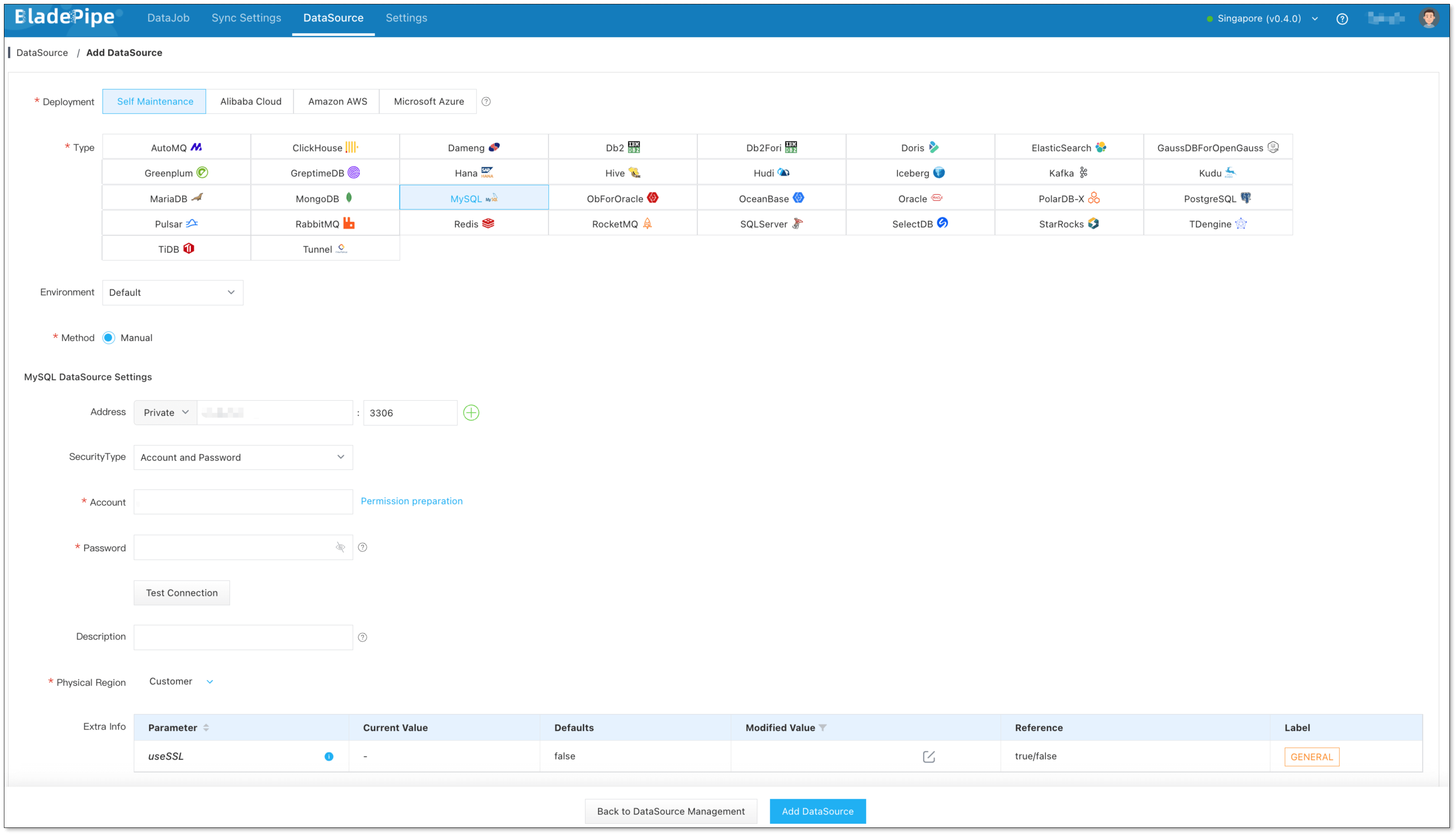
Step 1: Add DataSources
- Log in to the BladePipe Cloud.
- Click DataSource > Add DataSource.
- Select the source and target DataSource type, and fill out the setup form respectively.
Step 2: Create a DataJob
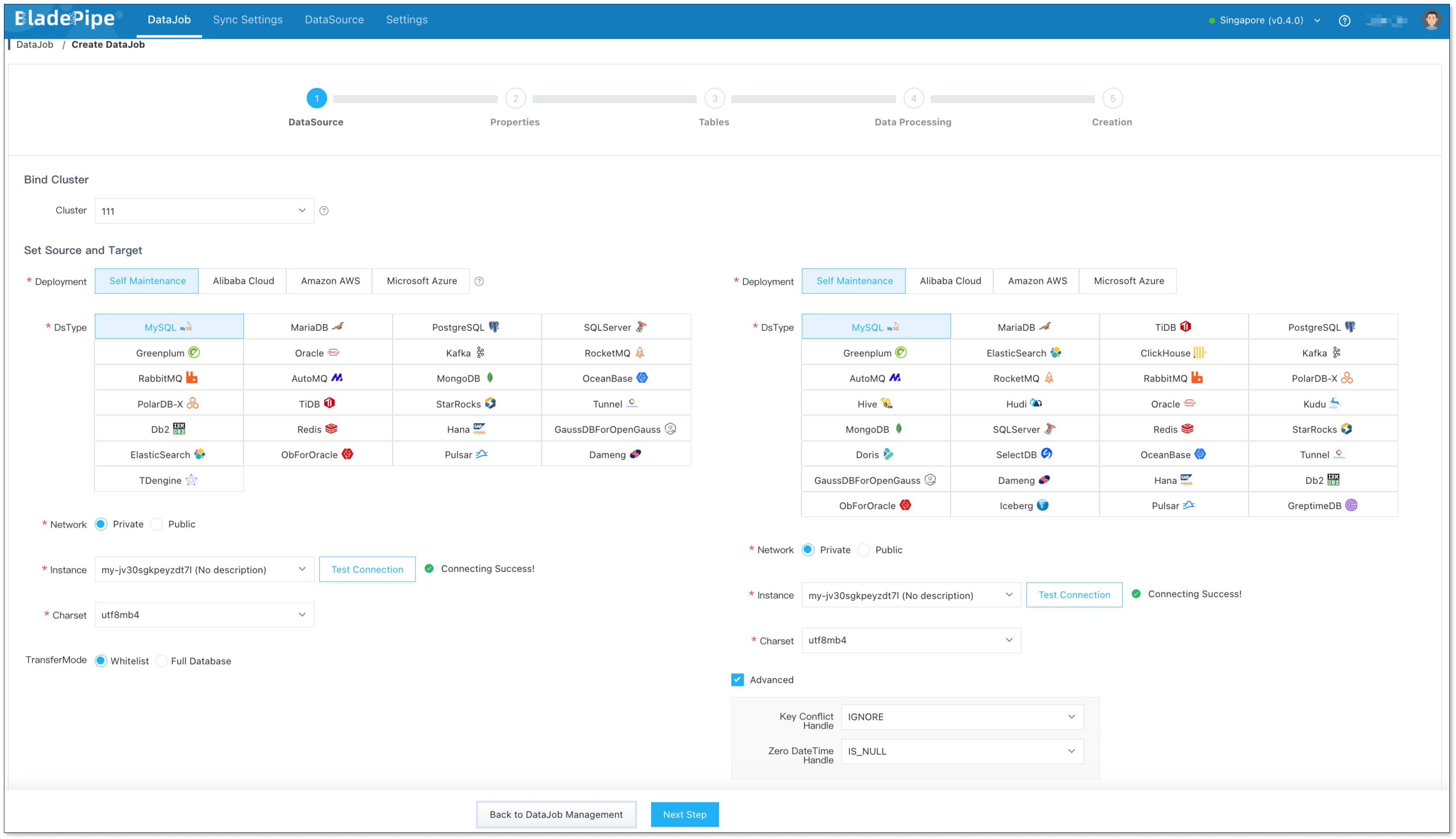
- Click DataJob > Create DataJob.
- Select the source and target DataSources.
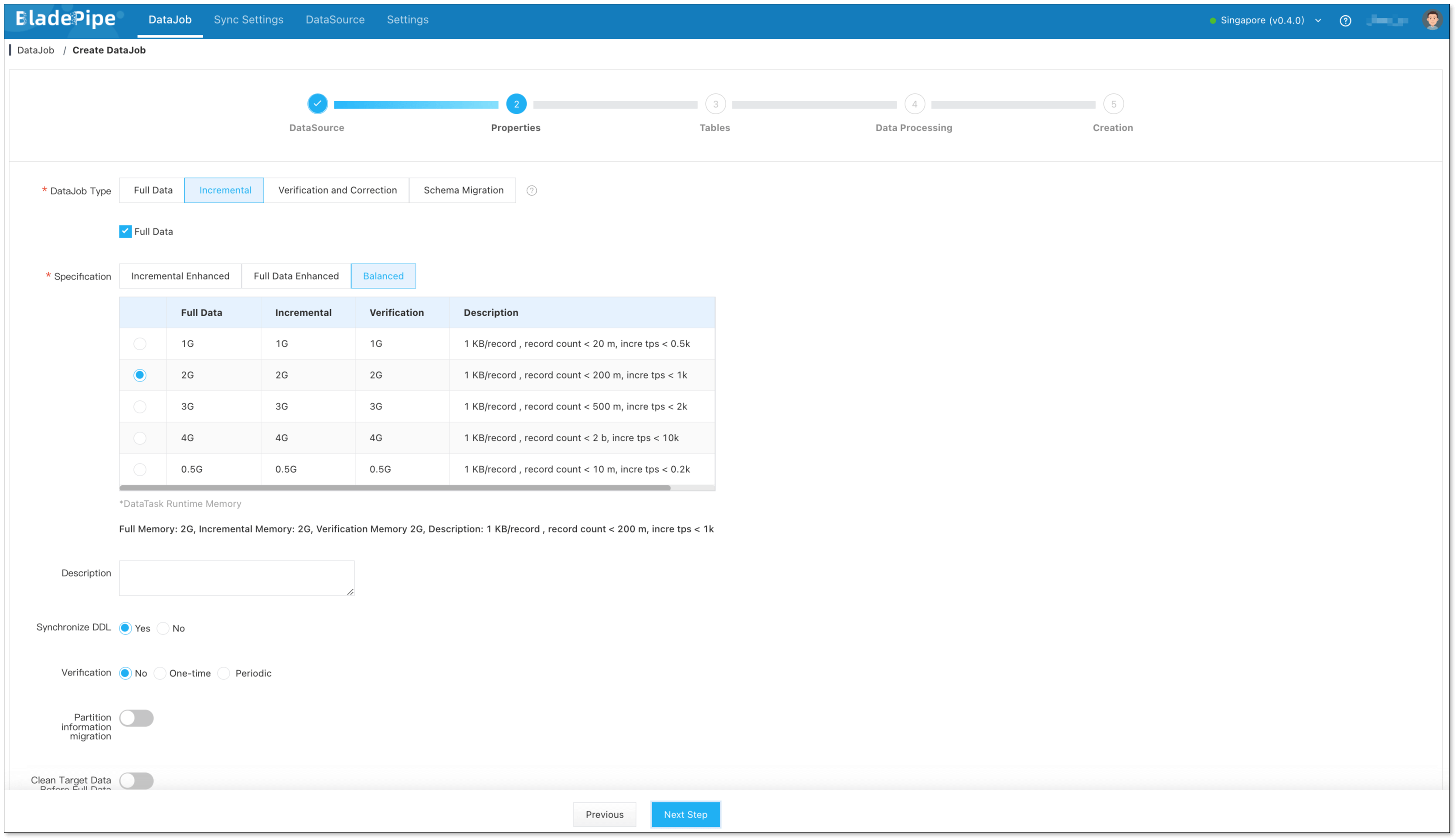
- Select Incremental for DataJob Type, together with the Initial Load option.
- Select the tables to be replicated.
- In the Data Processing step, select the table on the left side of the page and click Operation > Data Transform.
- Select the column(s) that need data transformation, and click the icon next to Expression on the right side of the dialog box. Select the data transformation script in the pop-up dialog box, and click it to automatically copy the script.
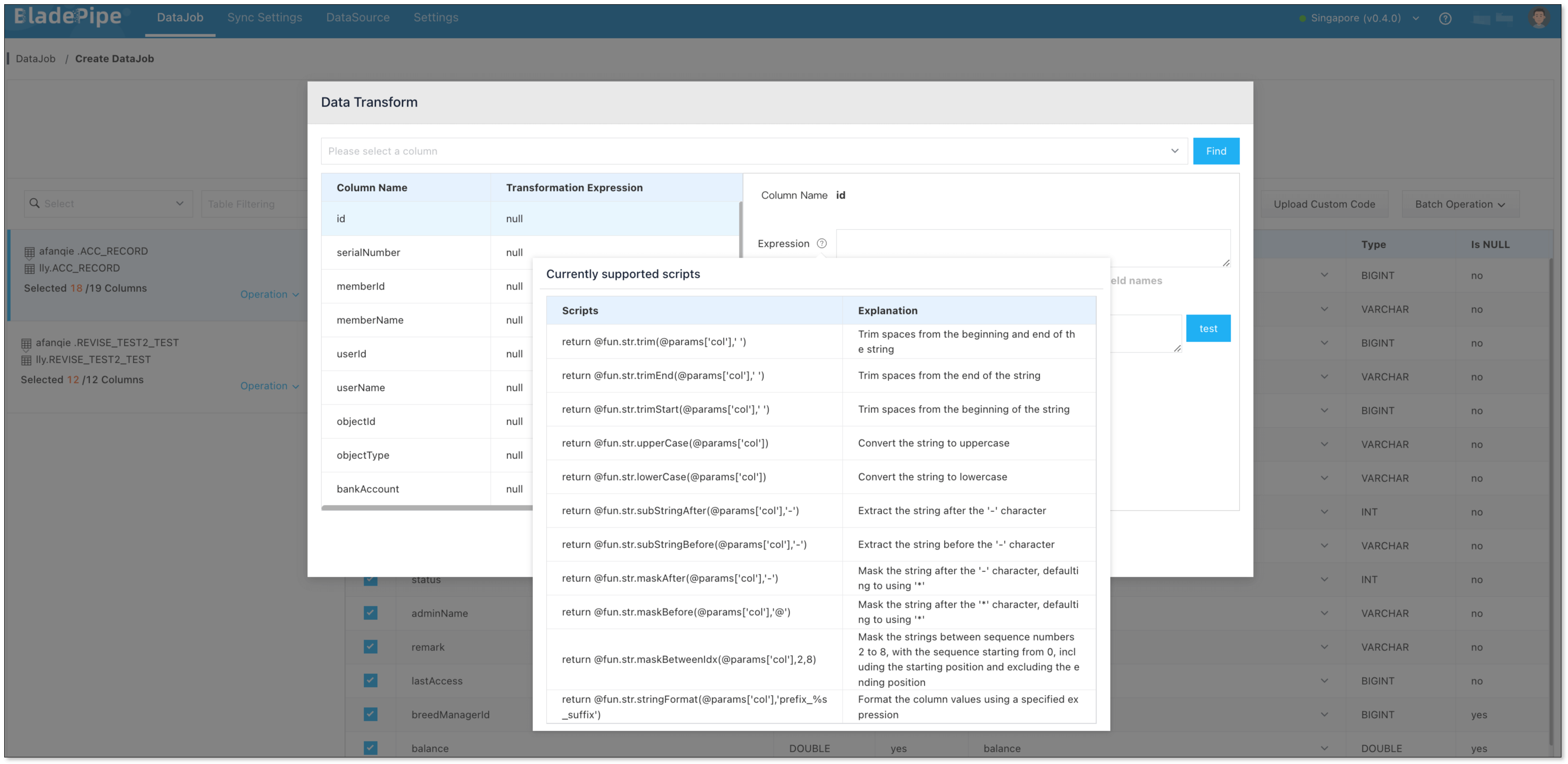
- Paste the copied script into the Expression input box, and replace
colin @params['col'] of the script with the corresponding column name. - In the Test Value input box, enter a test value and click Test. Then you can view how the data is masked.
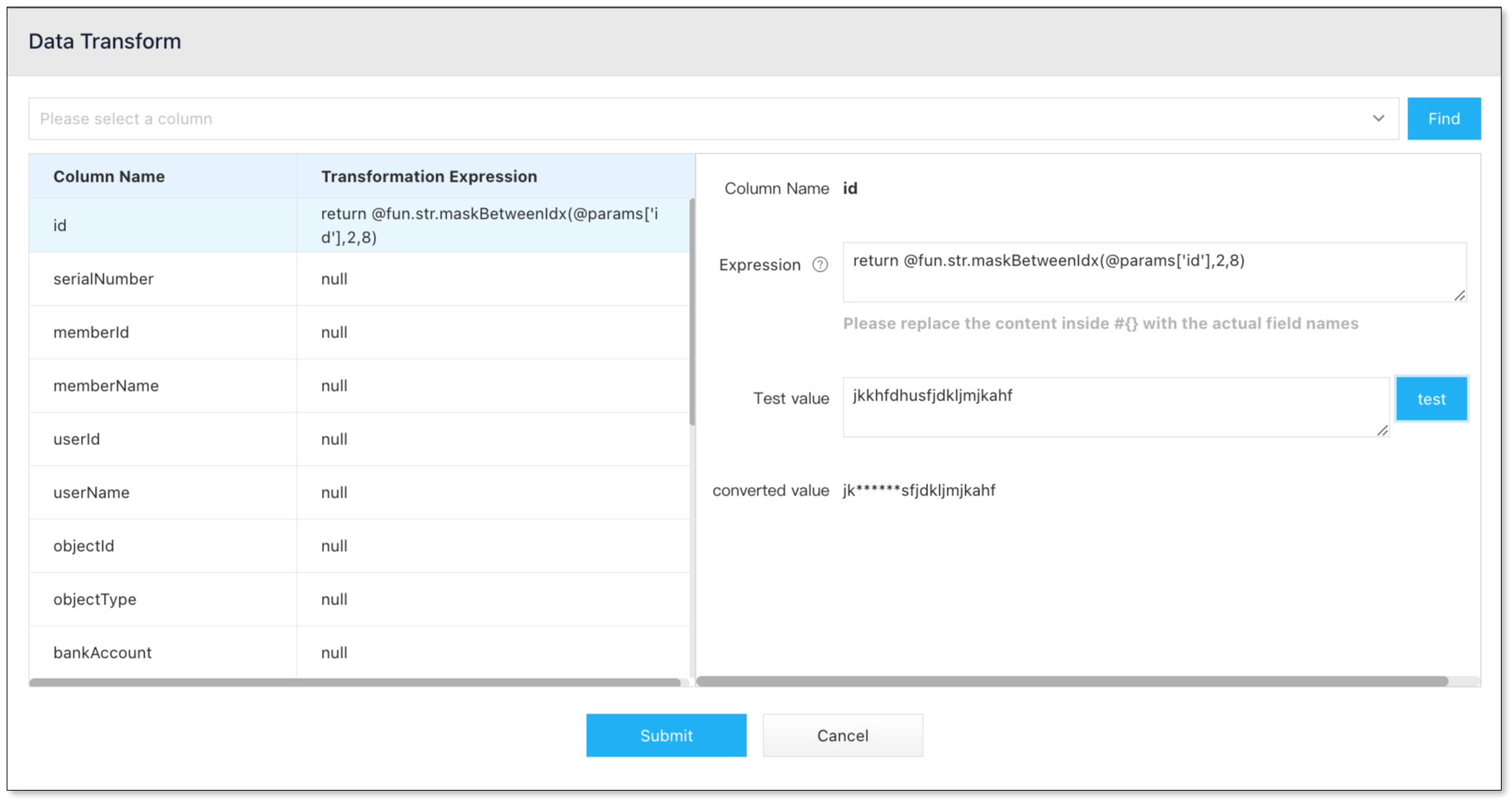
- Confirm the DataJob creation.
- Now the DataJob is created and started. The selected data is being masked in real time when moving to the target instance.

Wrapping Up
Data masking isn’t just a checkbox for compliance—it’s a smart move to protect your business and your users. Especially when working with real data in non-production environments or sharing it with others, static data masking gives you the safety net you need without slowing things down.
By integrating data masking directly into the data migration and sync process, tools like BladePipe make it easier than ever. No more juggling extra tools or writing custom code. You get clean, safe, ready-to-use data—all in one smooth step.
Whether you're testing, analyzing, or sharing data, masking should be part of your workflow. And now, it’s finally simple enough for everyone to use.