BladePipe Overview
BladePipe is a real-time, end-to-end data integration platform that streamlines data flow across homogeneous and heterogeneous databases.
Whether you need to build modern data pipelines, perform seamless data migrations, or implement CDC (Change Data Capture) for real-time synchronization, BladePipe provides a powerful, out-of-the-box solution. You can use its single, intuitive dashboard to manage your entire data replication lifecycle, from schema evolution to continuous monitoring.
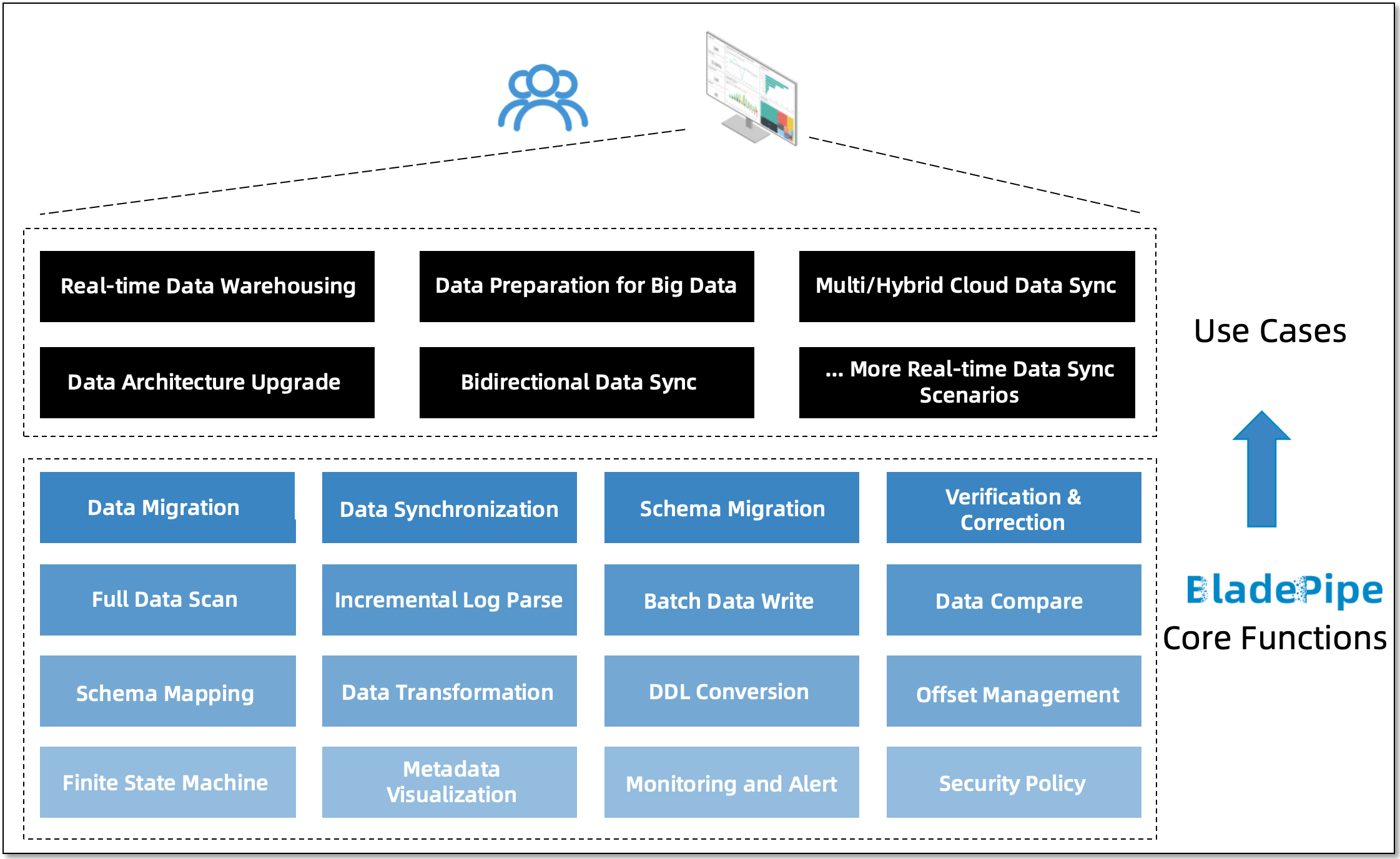
Core Capabilities
Data Migration (Batch ETL)
BladePipe migrates bulk data from your source to a target database. Built for high performance, it supports resumable transfers, parallel scanning, and batch writing to maximize throughput and minimize the impact on your operational systems.
You can easily map metadata, apply custom data processing logic, and filter records on the fly. For complex architecture transitions, you can integrate Data Migration with Schema Evolution and Data Verification to ensure strict data consistency.
Real-Time Data Sync (CDC)
A robust CDC engine continuously consumes incremental logs from your source database and replicates operations to the target in near real-time.
This continuous data pipeline supports dynamic DDL synchronization, event filtering, and custom code processing. It ensures highly efficient data writes, making it ideal for live analytics, caching, and real-time reporting.
Schema Evolution
BladePipe intelligently migrates and synchronizes table schemas across different database dialects.
It handles complex data type conversions and naming mappings automatically. You can run this capability independently or use it as an automated preparation step for your migration and synchronization pipelines.
Data Verification and Correction
BladePipe performs precise field-by-field comparisons between your source and target data to identify discrepancies, and corrects inconsistencies automatically.
You can run Data Verification as a standalone auditing tool or integrate it directly into your active data pipelines for continuous, automated quality assurance.
Supported Pipelines
The matrix below illustrates the supported data connectors. The vertical headings list the Source databases, and the horizontal headings display the Target databases.
For details on specific database engine versions and configurations, refer to Supported DataSources.
SOURCE/TARGET | MySQL/MariaDB/AuroraMySQL | Oracle | PostgreSQL | AuroraPostgreSQL | Greenplum | SQL Server | Db2 | Kafka | RocketMQ | RabbitMQ | AutoMQ | PolarDB-MySQL | Tunnel | MongoDB | DocumentDB | OceanBase | TiDB | PolarDB-X | Redis | Hana | StarRocks | ClickHouse | Doris | SelectDB | Elasticsearch | ADB for MySQL | openGauss | GaussDB for MySQL | Hive | Kudu | Iceberg | Dameng | Redshift | Pulsar | GreptimeDB | RagApi |
|---|---|---|---|---|---|---|---|---|---|---|---|---|---|---|---|---|---|---|---|---|---|---|---|---|---|---|---|---|---|---|---|---|---|---|---|---|
| MySQL/MariaDB/AuroraMySQL | ✔ | ✔ | ✔ | ✔ | ✔ | ✔ | ✔ | ✔ | ✔ | ✔ | ✔ | ✔ | ✔ | ✔ | ✔ | ✔ | ✔ | ✔ | ✔ | ✔ | ✔ | ✔ | ✔ | ✔ | ✔ | ✔ | ✔ | ✔ | ✔ | ✔ | ✔ | ✔ | ✔ | ✔ | ||
| Oracle | ✔ | ✔ | ✔ | ✔ | ✔ | ✔ | ✔ | ✔ | ✔ | ✔ | ✔ | ✔ | ✔ | ✔ | ✔ | ✔ | ✔ | ✔ | ||||||||||||||||||
| PostgreSQL | ✔ | ✔ | ✔ | ✔ | ✔ | ✔ | ✔ | ✔ | ✔ | ✔ | ✔ | ✔ | ✔ | ✔ | ||||||||||||||||||||||
| AuroraPostgreSQL | ✔ | ✔ | ✔ | ✔ | ✔ | ✔ | ✔ | ✔ | ✔ | ✔ | ✔ | ✔ | ||||||||||||||||||||||||
| Greenplum | ✔ | ✔ | ✔ | ✔ | ✔ | ✔ | ✔ | ✔ | ||||||||||||||||||||||||||||
| SQL Server | ✔ | ✔ | ✔ | ✔ | ✔ | ✔ | ✔ | ✔ | ✔ | ✔ | ✔ | ✔ | ||||||||||||||||||||||||
| Db2 | ✔ | ✔ | ✔ | ✔ | ✔ | ✔ | ||||||||||||||||||||||||||||||
| Hana | ✔ | ✔ | ✔ | ✔ | ||||||||||||||||||||||||||||||||
| PolarDB-MySQL | ✔ | ✔ | ✔ | ✔ | ✔ | ✔ | ✔ | ✔ | ✔ | ✔ | ✔ | ✔ | ✔ | ✔ | ✔ | ✔ | ✔ | |||||||||||||||||||
| MongoDB | ✔ | ✔ | ✔ | ✔ | ✔ | ✔ | ✔ | ✔ | ✔ | |||||||||||||||||||||||||||
| DocumentDB | ✔ | ✔ | ✔ | ✔ | ✔ | ✔ | ✔ | ✔ | ✔ | |||||||||||||||||||||||||||
| Kafka | ✔ | ✔ | ✔ | ✔ | ✔ | ✔ | ✔ | ✔ | ✔ | ✔ | ✔ | ✔ | ✔ | ✔ | ✔ | ✔ | ✔ | ✔ | ✔ | |||||||||||||||||
| RocketMQ | ✔ | ✔ | ✔ | ✔ | ✔ | |||||||||||||||||||||||||||||||
| RabbitMQ | ✔ | |||||||||||||||||||||||||||||||||||
| AutoMQ | ✔ | ✔ | ✔ | |||||||||||||||||||||||||||||||||
| OceanBase | ✔ | ✔ | ✔ | ✔ | ✔ | ✔ | ✔ | ✔ | ✔ | ✔ | ✔ | ✔ | ✔ | ✔ | ✔ | ✔ | ✔ | ✔ | ||||||||||||||||||
| OceanBase for Oracle | ✔ | ✔ | ||||||||||||||||||||||||||||||||||
| StarRocks | ✔ | ✔ | ||||||||||||||||||||||||||||||||||
| TiDB | ✔ | ✔ | ✔ | ✔ | ✔ | ✔ | ✔ | ✔ | ✔ | ✔ | ✔ | ✔ | ✔ | |||||||||||||||||||||||
| Elasticsearch | ✔ | ✔ | ✔ | |||||||||||||||||||||||||||||||||
| PolarDB-X | ✔ | ✔ | ✔ | ✔ | ✔ | ✔ | ✔ | |||||||||||||||||||||||||||||
| openGauss | ✔ | ✔ | ||||||||||||||||||||||||||||||||||
| Redis | ✔ | |||||||||||||||||||||||||||||||||||
| Pulsar | ✔ | ✔ | ||||||||||||||||||||||||||||||||||
| TDengine | ✔ | |||||||||||||||||||||||||||||||||||
| Dameng | ✔ | ✔ | ✔ | ✔ | ✔ | ✔ | ✔ | |||||||||||||||||||||||||||||
| SshFile | ✔ | ✔ | ||||||||||||||||||||||||||||||||||
| S3File | ✔ | ✔ | ||||||||||||||||||||||||||||||||||
| OssFile | ✔ | ✔ | ||||||||||||||||||||||||||||||||||
| Tunnel | ✔ | |||||||||||||||||||||||||||||||||||
| Spanner | ✔ | ✔ |
Get Started with BladePipe
Read the following pages to help you build your first pipeline:
- Install BladePipe(Docker): Install BladePipe with one command using Docker.
- Quick Start: Get started to build your first pipeline in minutes.
- Create Incremental Data Sync Pipeline: Create a pipeline that combines schema migration, full data load and incremental data sync automatically.