Data Verification: Definition, Methods, Checklist, and Best Practices

Data verification checks whether data in a target system matches the source after migration, replication, synchronization, or ETL processing.
When data moves from one system to another, teams need to answer practical questions: Were all rows copied? Did updates and deletes arrive? Did column values change? Are there duplicate, missing, or corrupted records? Data verification provides the checks needed to prove that source and target data are accurate and consistent.
Quick Answer: What Data Verification Checks
Data verification usually checks five areas:
| Check | What it verifies | Example |
|---|---|---|
| Row count | Whether source and target have the same number of rows | orders has 10,000,000 rows in both systems |
| Primary key coverage | Whether every source key exists in the target | No missing order_id values |
| Field-level values | Whether column values match | status, amount, and updated_at are identical |
| Deletes and updates | Whether changed rows are reflected downstream | Cancelled orders are cancelled in the target |
| Data freshness | Whether replication lag is acceptable | Target is less than 10 seconds behind source |
For database migration and CDC replication, row counts alone are not enough. A table can have the same number of rows while still containing wrong values, missed updates, or duplicated records.
What is Data Verification?
Data verification is the process of confirming that data has been accurately and completely transferred from a source system to a target system. It validates data integrity, consistency, and correctness so teams can confirm that no data was lost, altered, duplicated, or corrupted during movement.
In database migration and replication projects, verification is often performed after:
- Initial full data load
- Incremental CDC synchronization
- Schema migration
- Cutover rehearsal
- Production cutover
- Periodic sync health checks
Why Data Verification is Needed?
Ensuring Data Quality
In data replication, some data records may be skipped or failed to move to the target instance. That results in data loss and inconsistencies. Verification plays a key role in ensuring that data is completely and accurately moved from the source to the target.
Key aspects of data verification:
- Completeness: Ensure that all data of the source instance is present in the target instance.
- Integrity: Confirm that the data has not been altered or tampered with.
- Consistency: Verify that the data in the source instance is in line with that in the target instance.
Enhancing Data Reliability
Stakeholders, including users and management, need confidence that the data replication is successfully done. Data verification provides solid evidence on data reliability. When data is verified, users have more trust in what they get, and more confidence to use the data for analytics.
Supporting Decision-making
Accurate and complete data is the backbone for data-driven insights. Any minor inconsistency, if not be identified and corrected, may lead to misunderstanding and huge costs. Data verification ensures that the data represents the accurate and real situation, offering a basis for wise decision making.
Data Verification Methods Compared
| Method | Best for | Limitation |
|---|---|---|
| Row count comparison | Fast first-pass validation | Misses wrong values and duplicate replacements |
| Checksum comparison | Large tables where full row comparison is expensive | Needs stable ordering and compatible data formatting |
| Primary key comparison | Finding missing or extra rows | Does not prove all fields are correct |
| Field-by-field comparison | High-confidence validation | More expensive on large datasets |
| Sampling | Quick checks on very large datasets | Can miss rare errors |
| Automated verification and correction | Production migration and replication | Requires a tool that can compare and repair differences safely |
The right method depends on data volume, latency requirements, risk tolerance, and whether the target is used for analytics, production applications, or compliance reporting.
Data Verification Checklist
Use this checklist before trusting a migration or replication result:
- Source and target schemas are aligned.
- Primary keys or stable unique keys are available.
- Row counts match for critical tables.
- Primary key coverage has no missing or extra rows.
- Important columns pass field-level comparison.
- Deletes and updates are verified, not only inserts.
- Data type conversions are reviewed for precision, timezone, encoding, and null handling.
- Replication lag is within the accepted threshold.
- Mismatches are logged, reviewed, and corrected before cutover.
How to Verify Data?
Manual Verification
Manual verification involves human efforts to check data integrity, completeness, and consistency. For small datasets or specific cases requiring human judgment, you may find it's a cost-effective choice, because no specialized tools are needed. However, when there are hundreds of thousands of records of data to be verified, the manual way is time-consuming and labor-intensive, and human errors are tend to occur. That makes it hard to trust in data quality even after verification.
Automated Verification
Compared with the manual way, automated tools are faster, and more efficient, especially for large datasets. A large volume of data can be verified in only a few seconds, helping accelerate your data replication project. No human intervention is needed in this process, reducing human errors and ensuring consistency of every verification. Also, automated tool usually can correct the discrepancies automatically, saving much of your time and energy.
Data Verification Best Practices
Here, we introduce a tool for automatic data verification and correction after data replication -- BladePipe.
BladePipe fetches data from the source instance batch by batch, then uses the primary key to fetch the corresponding data from the target instance using SQL IN or RANGE. The data with no matching data found in the target is marked as Loss, and then each row of data is compared on a field-by-field basis.
By default, all data is verified. Also, you can narrow the data range to be verified using filtering conditions. For the discrepancies, BladePipe performs 2 additional verifications to minimize the false result caused by the latency of data sync, thus improving the verification performance significantly.
With BladePipe, data can be verified and corrected in a few clicks.
Step 1: Install BladePipe
Follow the instructions in Install Worker (Docker) or Install Worker (Binary) to download and install a BladePipe Worker.
Step 2: Add DataSources
- Log in to the BladePipe Cloud.
- Click DataSource > Add DataSource.
- Select the source and target DataSource type, and fill out the setup form respectively.
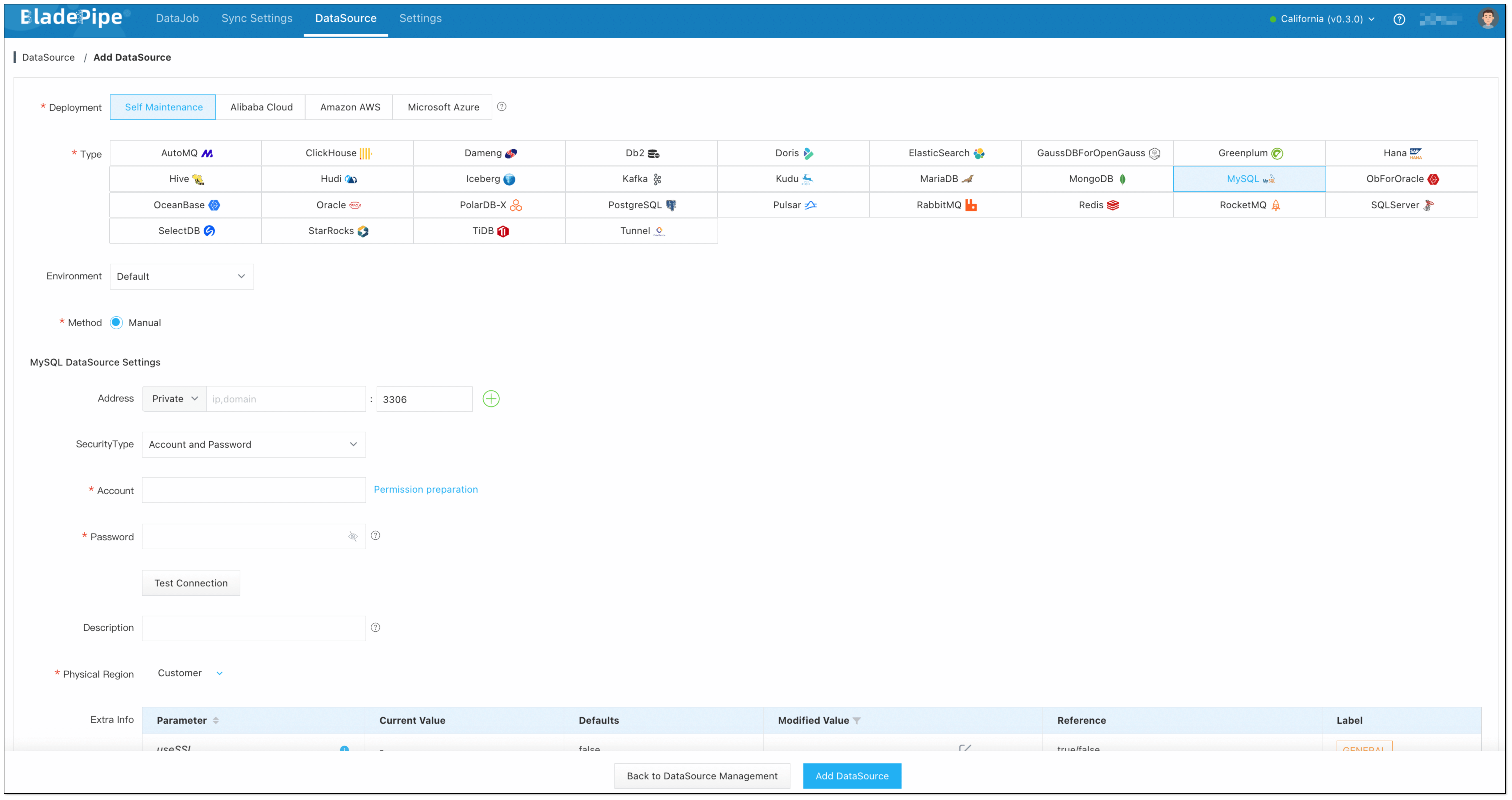
Step 3: Create a DataJob
-
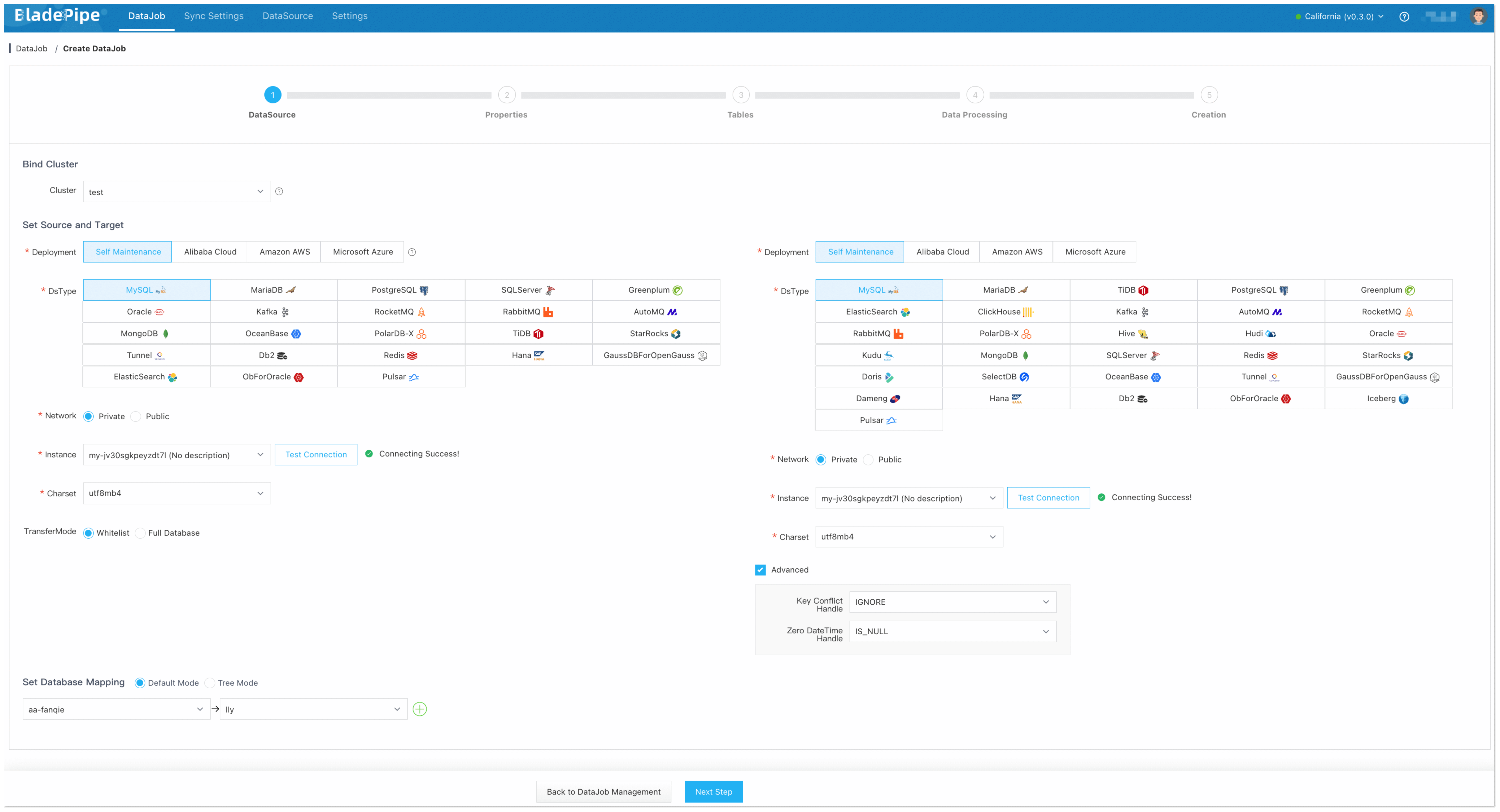
Click DataJob > Create DataJob.
-
Select the source and target DataSources, and click Test Connection to ensure the connection to the source and target DataSources are both successful.
-
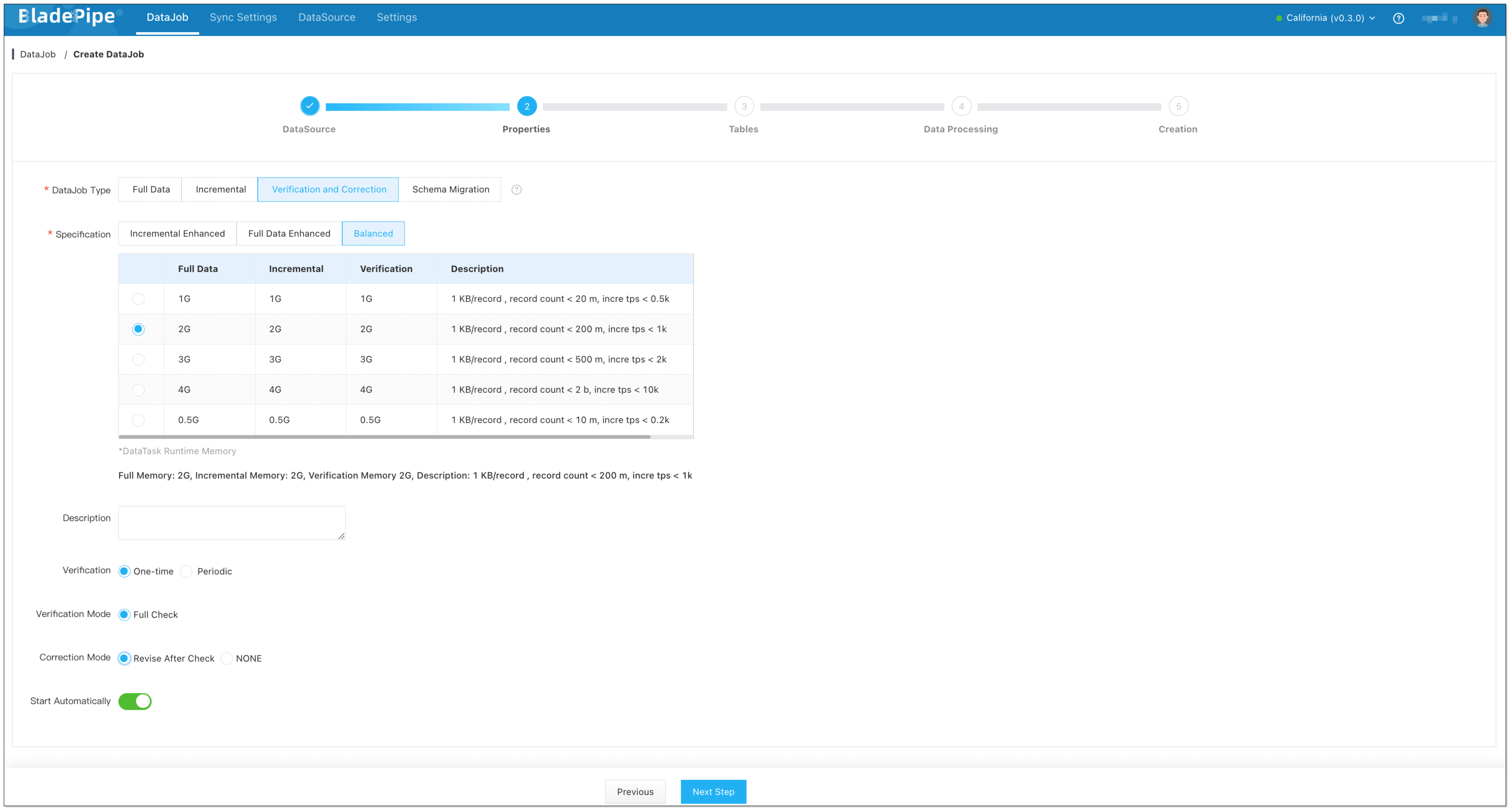
Select Verification and Correction for DataJob Type, and configure the following items:
- Select One-time for Verification.
- Select Correction Mode: Revise after Check / NONE.
- Revise after Check: The data will be automatically corrected after the verification is completed.
- NONE: The data will not be automatically corrected after the verification is completed.
-
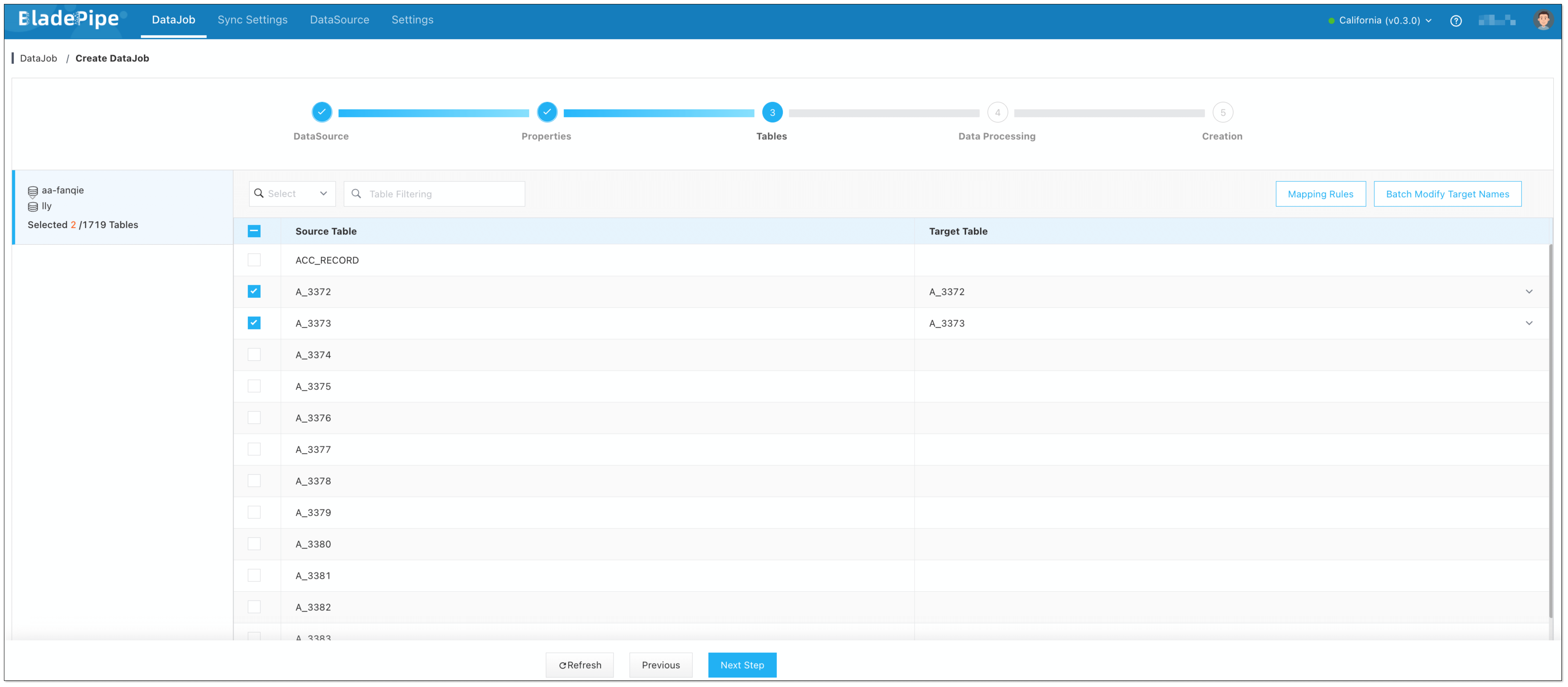
Select the tables to be verified. Only existing tables can be selected.
-
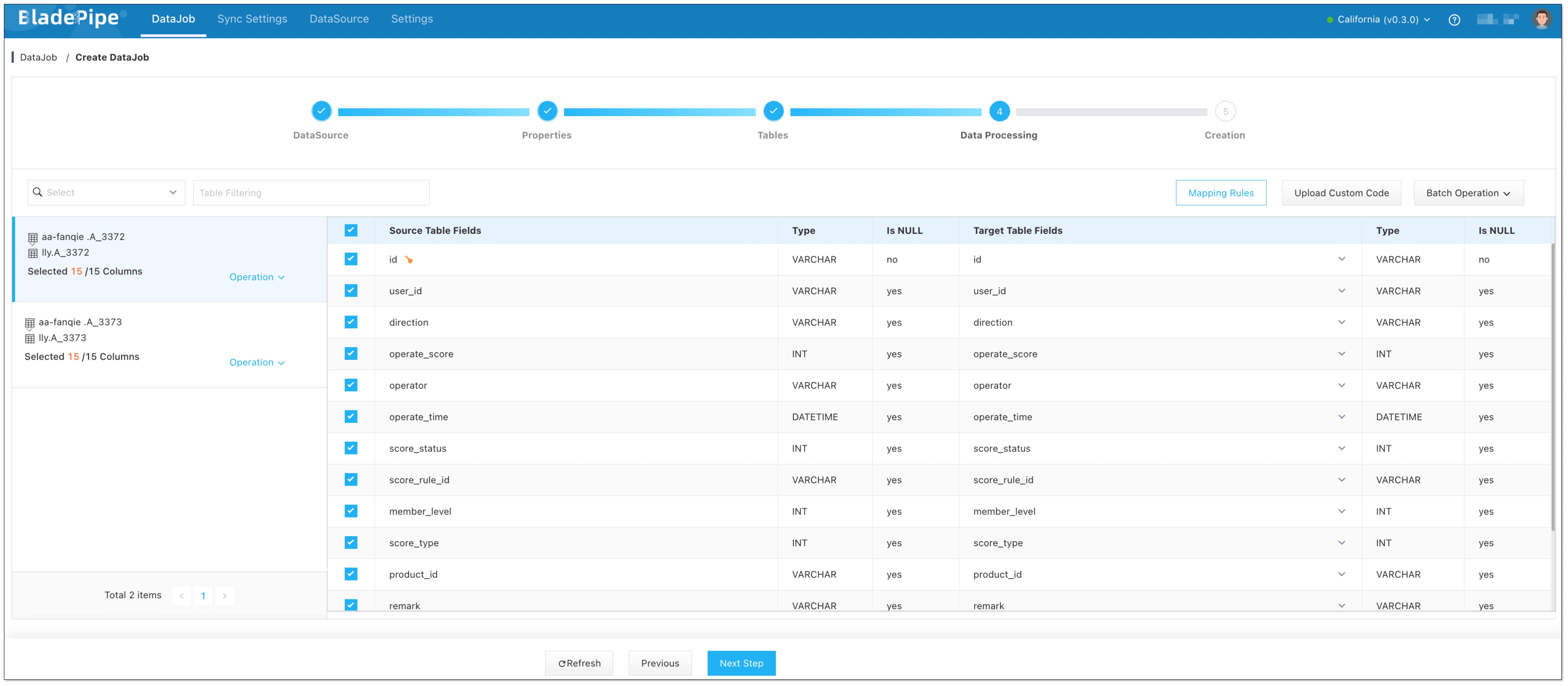
Select the columns to be verified.
-
Confirm the DataJob creation. Then go back to the DataJob page, and check the data verification result.

Summary
Data verification is a vital process in data migration and sync to ensure data accuracy, consistency, and completeness. Use automated tools like BladePipe, data verification is easier than ever before. Just a few clicks, and data can be verified and corrected right after migration and sync.